





OnlyFans Tracking Links: What They Are and How to Create One
In this article (9)
One tracking link per promotion shows exactly which places bring paying fans: OnlyFans counts the clicks and subscribers each link brings.
Below: what tracking links measure, how to create one, how to name them, where to see and read the results, tracking links vs free trial links, and what they don't show.
What is a tracking link on OnlyFans?
An OnlyFans tracking link is a special version of your profile link that you create for one promotion, such as a Reddit post or a paid ad. OnlyFans counts how many people click it and how many subscribe through it, so you can see which places bring you paying fans.
| Question | Answer |
|---|---|
| 🔗 What it is | A version of your profile link for one promotion |
| 📊 What it counts | Clicks and subscribers |
| ⚙️ Where to create it | More → Settings → Subscription price and bundles → Tracking Links |
| 🏷️ How to name it | Where it is used and what you posted, such as ig-bio |
| ✅ The one rule | One link per place, and never reuse a link |
Without tracking links, every new fan looks the same. With one link per place you promote, you can stop guessing and put your time into the places that work.
How to create a tracking link on OnlyFans
To create an OnlyFans tracking link, click More, open Settings, choose "Subscription price and bundles" and open the Tracking Links tab. Click "Create New Tracking Link" and name it after where you'll use it, such as the platform and the ad. Copy the link and share it. OnlyFans counts its clicks and the subscribers it brings.
Step by step:
- Click More in the menu and open Settings.
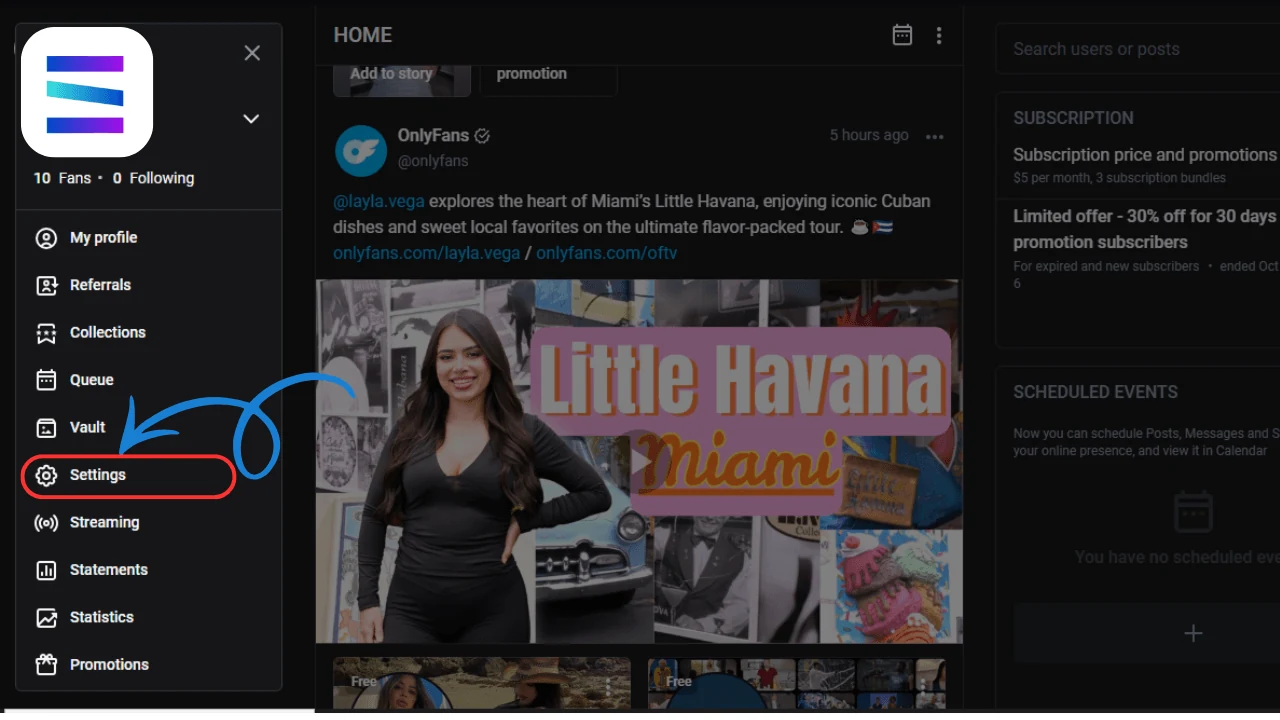
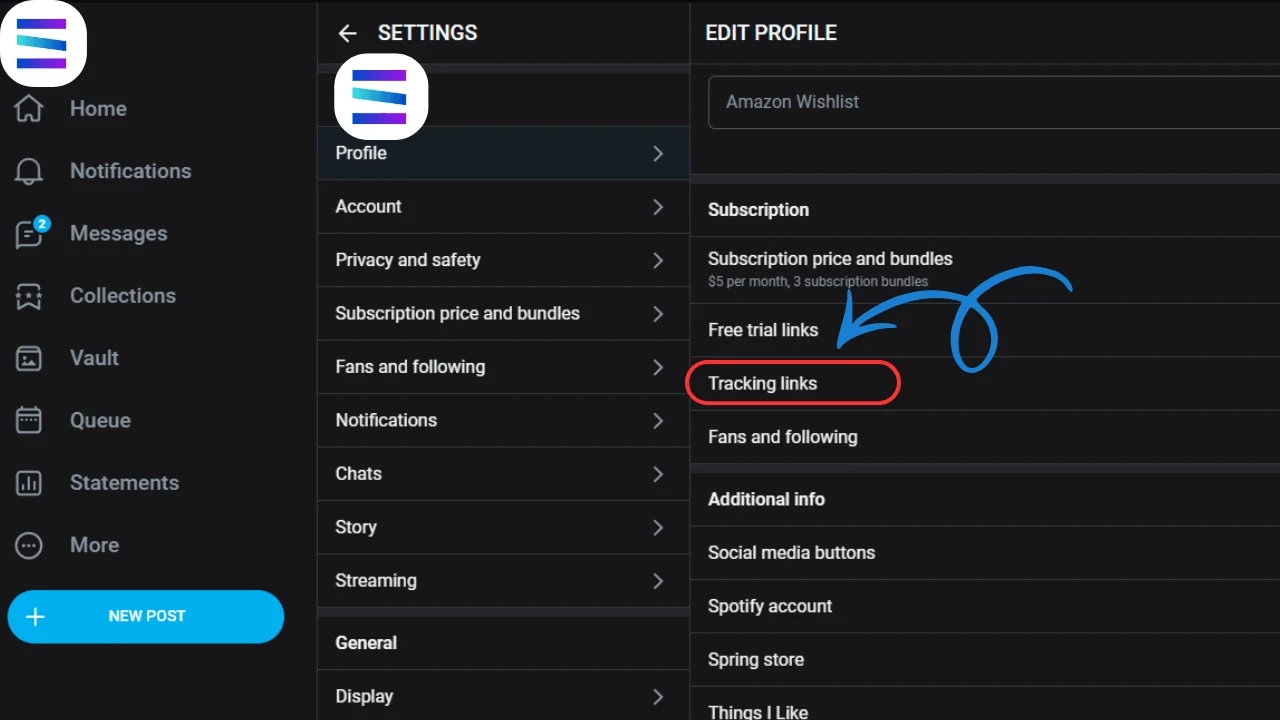
- Choose Subscription price and bundles and open the Tracking Links tab.
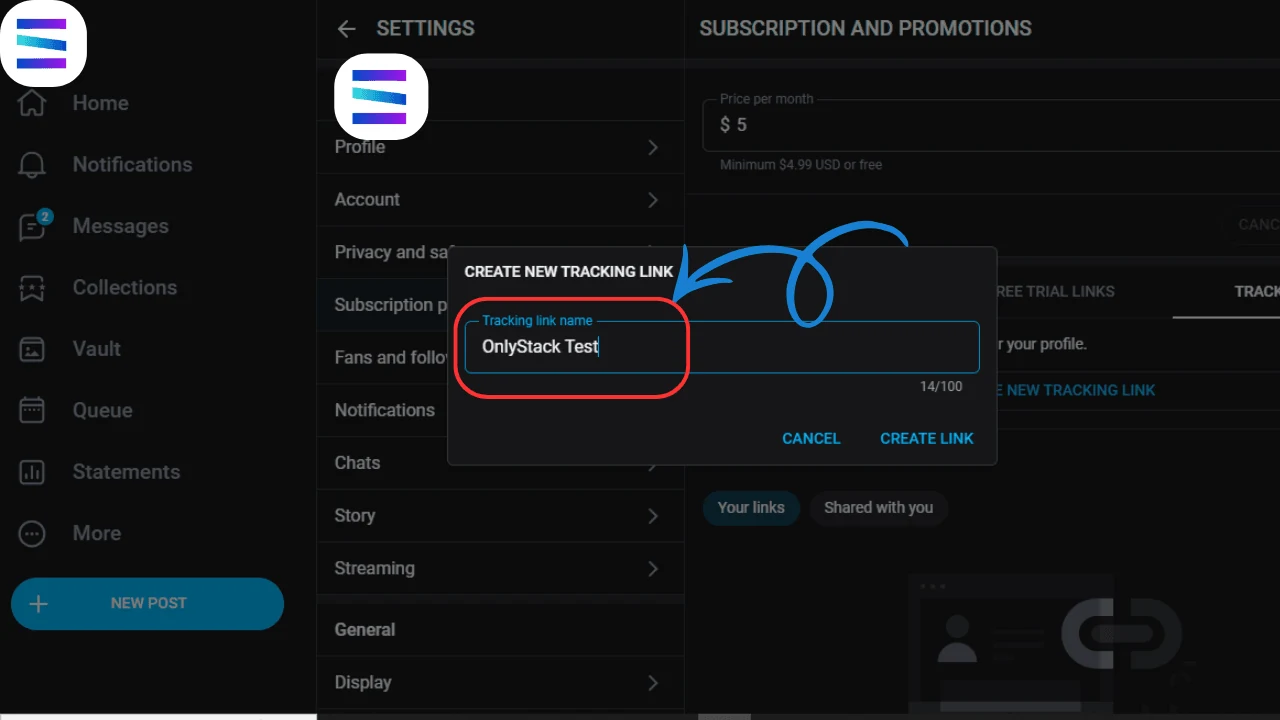
- Click Create New Tracking Link and enter a name (see the naming examples below).
- Copy the link and use it in that one place only: your Reddit post, your Instagram bio, or the ad you bought.
How to name your OnlyFans tracking links
Name every link after where it is used and what you posted, so the list still makes sense months later. Pick one pattern and stick to it.
| Where you promote | Example name |
|---|---|
| Instagram bio | ig-bio |
| One Reddit subreddit group | reddit-cosplay-subs |
| A paid shoutout | shoutout-[account]-oct |
| A TikTok video | tiktok-[video topic] |
| An X (Twitter) pinned post | x-pinned |
| A paid ad from a supplier | ad-[supplier]-[creative] |
Two rules make the data useful: one link per place, and never reuse a link for a different promotion. If two places share a link, you can't tell which one worked.
If you use a link-in-bio page such as Linktree, put a different tracking link behind each button there too. Otherwise every visit from that page looks the same.
Where to see your tracking link results
Once a link is live, open the same Tracking Links tab. Each link shows its click count and how many people subscribed through it.
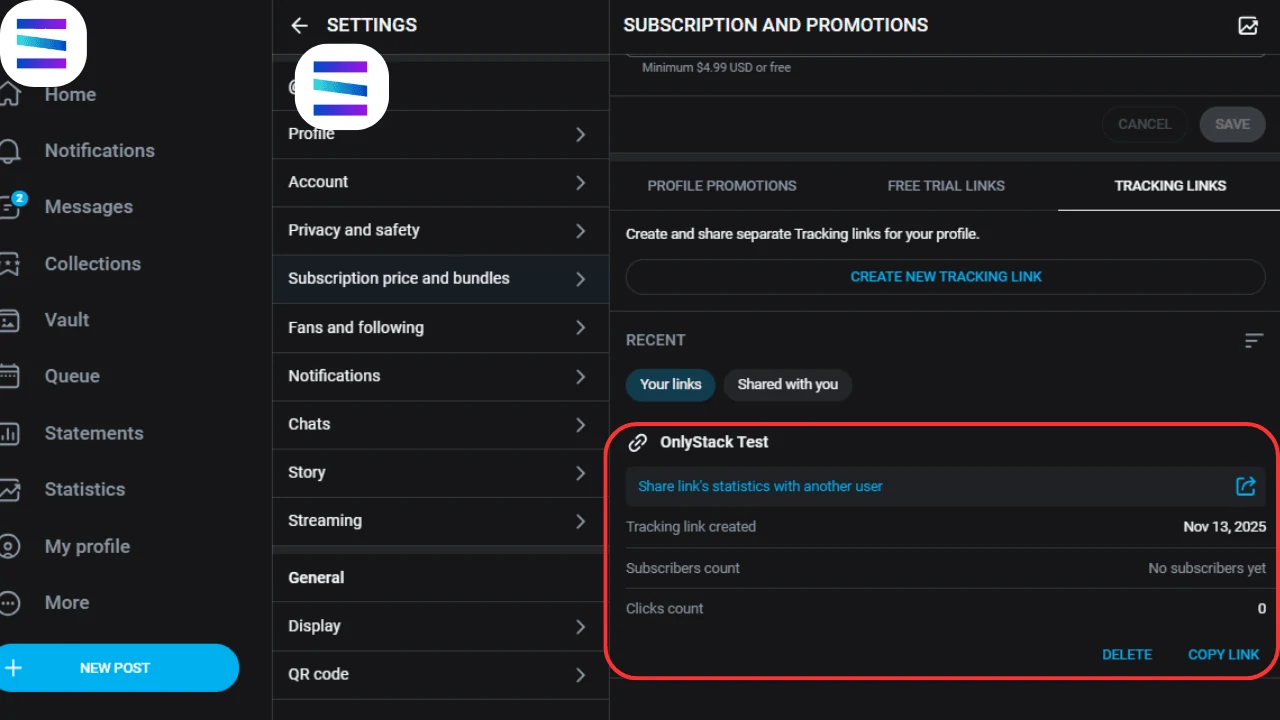
Check what your own account shows before relying on a number. OnlyFans does not explain in detail how it counts repeat clicks from the same person, so treat clicks as a guide and subscribers as the number that matters.
How to read the numbers
- Subscribers per link tell you which places bring fans. This is the number to compare.
- Subscribers divided by clicks is your conversion rate. A link with many clicks but few subscribers means people are curious but your profile or price doesn't convince them. For example, a Reddit link with 400 clicks and 12 subscribers converts at 3%, and an X link with 150 clicks and 9 subscribers converts at 6%: fewer visitors, but better ones.
- Compare over the same period. A link that has been live for three months will always beat one made last week.
- Paid promotions: divide what you paid by the subscribers the link brought to get your cost per subscriber. If it costs more than a fan usually spends, stop buying that promotion.
Using several tracking links on OnlyFans
Tracking links on OnlyFans work best as a set: one link for every place you promote, all named with the same pattern. Before you post somewhere new, make a tracking link on OnlyFans for that place first, so its very first visitors are counted.
A simple routine keeps the set useful:
- Give every place its own link. Your Instagram bio, each Reddit group, each paid shoutout and each ad get a separate link, and so does every button on a link-in-bio page such as Linktree.
- Never move a link to a new promotion. When you start something new, make a new link for it, so the old link's numbers still describe the old promotion.
- Review the links together. Open the Tracking Links tab, compare subscribers per link over the same period, and work out each link's conversion rate (subscribers divided by clicks).
- Act on what you see. Put more of your time into the places that bring subscribers. For paid promotions, stop buying any that cost more per subscriber than a fan usually spends.
Treat clicks as a guide and subscribers as the number that decides where your effort goes next.
Tracking links vs free trial links
A tracking link sends people to your normal page, so they pay your usual subscription price. A free trial link gives new fans free or discounted access for a limited time. Both can be tracked, but count them separately: someone who joins on a free trial hasn't paid yet, so a trial link with many subscribers is not the same as a tracking link with many paying subscribers. For how trial links work, see OnlyFans free trial links.
| Tracking link | Free trial link | |
|---|---|---|
| What the fan pays | Your normal subscription price | Nothing (or less) for a limited time |
| Best for | Finding out which promotion works | A burst of new fans, e.g. a launch or collab |
| Limits | No end date of its own | You set how many people can claim it and when it expires |
| What it counts | Clicks and subscribers | Clicks and claims |
What tracking links don't show
Tracking links count clicks and subscribers. They don't show what the fans from each link spend afterwards on messages, tips and renewals, so a link that brings 50 fans who never buy can look better than one that brings 10 big spenders. To compare links by revenue, you need to match fans to the link they came from, which is what third-party analytics tools do.
If you manage several accounts, OnlyStack's desktop app has a Promotions screen that lists each account's tracking (campaign) links and trial links with their clicks and subscribers in one place, so you don't have to open every OnlyFans account to check.
FAQ
What is a tracking link on OnlyFans?
A version of your OnlyFans profile link that counts the clicks and subscribers coming from one place, so you can see which promotion works.
How do I make a tracking link on OnlyFans?
Go to More, then Settings, then "Subscription price and bundles", open the Tracking Links tab and click "Create New Tracking Link". Name it, copy it and use it in one place.
How many tracking links can I make?
Make one for every place you promote. Many separate, clearly named links are more useful than a few shared ones.
Do tracking links show how much money each fan spent?
Check what your own account shows. Tracking links are built to count clicks and subscribers; for spending per fan, look at each fan's history or use a CRM.
Should I use a tracking link in my Instagram bio?
Yes. Give your bio its own link, separate from links in posts or stories, so you know how many fans each one brings.
For more ways to bring fans to your page, read ways to promote OnlyFans and how to promote OnlyFans on Reddit.